CO2 Laser Machine Buyers Guide for Wood and Acrylic
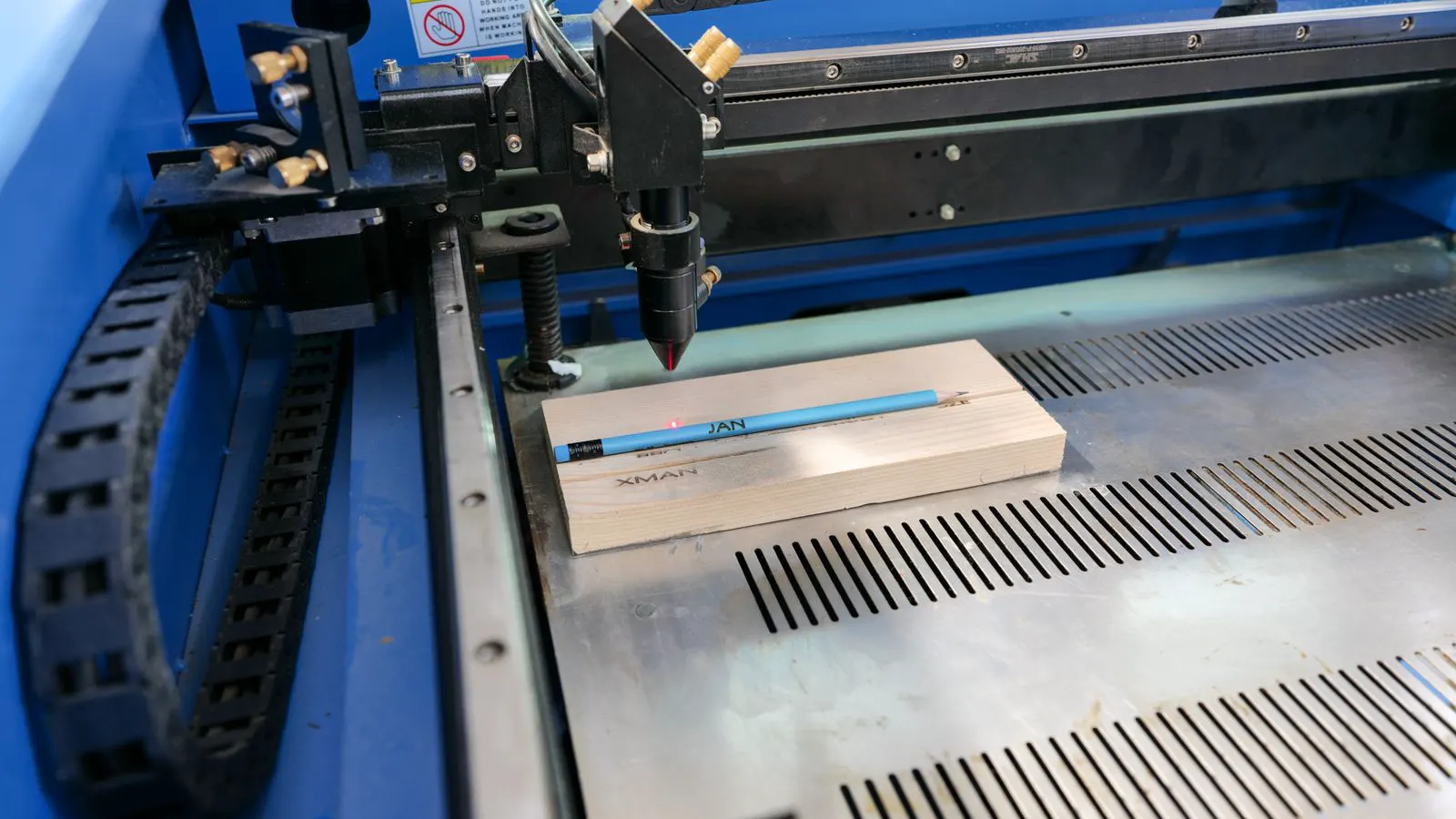
A CO2 laser machine buyer must evaluate tube power, beam quality, motion speed, and material compatibility. This guide breaks down the technical parameters required for cutting wood and engraving acrylic, focusing on operational reliability and material finish.
- Match tube power to the maximum thickness of the base material you plan to cut.
- Beam quality and focusing optics determine the quality of engraving on transparent materials like acrylic.
- Motion system accuracy is the primary driver of edge quality and repeatability in cut parts.
- Evaluate maintenance access and consumable costs to ensure long-term operational efficiency.
Define the Material and Depth Requirements
Identify the exact materials and depths involved in your production workflow before evaluating specific machine types. A CO2 laser machine is a tool for non-metallic materials, and its performance depends on the interaction between the beam and the specific substrate.
Wood and acrylic present different challenges. Wood is an organic material that chars during cutting. Acrylic is a thermoplastic that melts at the beam path. If you plan to cut basswood at six millimeters, you need a different power capability than if you are engraving fine details on two-millimeter acrylic.
Start by listing your stock sizes. A common error is buying a machine based on the maximum sheet size the platform accepts, ignoring the maximum thickness of the material you will actually process. If your primary work is thin veneer, a high-power tube is an overkill that increases operating costs and maintenance complexity.
Consider the specific properties of the substrates you handle. Wood contains moisture and varying densities that affect heat absorption. Acrylic has a specific melting point and a tendency to fog if the beam is too slow. The density of the wood matters as much as the species. Hardwoods like maple resist the beam differently than softwoods like pine or basswood. Pine chars quickly and produces more smoke, while maple requires more energy to penetrate.
For acrylic, the color of the material impacts the final result. Clear acrylic produces a frosted, matte finish when engraved. Colored acrylics, such as red or blue, often require higher power or slower speeds to achieve the same opacity and contrast. The depth of the cut also changes the edge quality. A shallow cut on acrylic may leave a burr or a rough edge that requires sanding. A deep cut creates a clean profile if the power is sufficient to vaporize the material in a single pass.
List every material you intend to use. This includes not just the primary stock but also the backing materials. If you cut wood and then laminate it, the machine must handle the combined thickness during the initial cut. If you engrave acrylic and then mount it on a wooden frame, the machine must accommodate both processes.
Determine the maximum thickness of the material you will process. This is distinct from the sheet size. A 1200 by 900 millimeter sheet of 30 millimeter plywood requires a machine with a specific power rating. A 1200 by 900 millimeter sheet of 3 millimeter acrylic requires a different setup. The working area is one constraint. The material thickness is another.
Check the minimum thickness you need to cut. Very thin materials, such as 0.5 millimeter acrylic or 1 millimeter veneer, can burn easily if the power is too high. The machine must be capable of low-power settings to handle these delicate substrates without charring the edges.
Evaluate Tube Power and Beam Quality
Tube power is the most quoted specification in a CO2 laser machine buyers guide, but it is not the only factor. The tube size, usually measured by the diameter of the glass envelope, determines the energy output. Larger tubes provide higher power but are heavier, more expensive, and harder to align.
For wood cutting, power dictates speed and kerf width. Higher power allows the beam to pass through the material in fewer passes. This reduces the charring on the edges and allows for faster production cycles. For acrylic engraving, power is less critical than beam quality.
Beam quality refers to the alignment and focus of the laser beam. A well-focused beam produces a smaller spot size on the material. On acrylic, a tight focus creates sharp, high-contrast lines. A poor beam quality results in a blurry, etched look with less depth. Check the manufacturer’s data for the spot size at the working distance. Smaller spot sizes are generally better for fine detail work.
Power is measured in watts. The rated power of the tube is the maximum continuous output. However, the actual power delivered to the material depends on the efficiency of the optics and the alignment of the beam path. A poorly aligned tube may deliver less power to the lens, even if the tube itself is capable of high output.
For wood, the power setting influences the cut speed. If you set the power too high for the material thickness, the edges will char severely. If you set it too low, the machine may need multiple passes, which increases heat buildup and further charring. The goal is to find the sweet spot where the beam vaporizes the material quickly enough to prevent excessive heat diffusion.
For acrylic, the power setting affects the depth of the engraving. A higher power setting creates a deeper engraving in a single pass. This can be useful for text that needs to be legible from a distance. However, if the power is too high, the acrylic may melt and fog, obscuring the detail. A lower power setting creates a shallower, more controlled engraving that is better for fine lines and small text.
Beam quality is often measured by the divergence of the beam. A lower divergence means the beam stays tighter over longer distances. This is important if you are using a long working distance or a complex optical path. Check the manufacturer’s specifications for the beam quality parameter. A high-quality beam maintains its focus over a wider range of working distances, which is useful if you are working with materials of varying thicknesses.
Motion System and Accuracy
The motion system moves the gantry or the worktable. The accuracy of this system determines how well your cut lines match the digital file.
For cutting, accuracy affects part tolerance. If you are manufacturing interlocking parts or templates, the motion system must be precise. Look for linear rails and ball screws rather than simple belts for high-precision work. The repeatability of the machine matters as much as its initial accuracy.
For engraving, the motion system controls the fill rate and line spacing. A smooth, jitter-free motion is required for consistent shading. Vibration in the motion system can cause ghosting or uneven depth in the engraved area. Evaluate the maximum travel speed and acceleration. Higher speeds are useful for large area work, but they must be balanced with the machine’s ability to maintain accuracy at those speeds.
The type of motion system determines the rigidity of the machine. A rigid frame reduces vibration during acceleration and deceleration. This is critical for engraving. If the frame flexes, the beam will wander slightly as the gantry moves, causing the engraved lines to vary in depth or position.
For cutting, the motion system must be able to stop and start quickly. If the machine is cutting a complex shape with many corners, the acceleration and deceleration settings must be optimized to prevent the beam from drifting off the intended path. A machine with high acceleration can handle these transitions better than one with low acceleration.
Check the repeatability of the machine. Repeatability is the ability of the machine to return to the same position after a cycle. This is important if you are cutting multiple parts of the same design. If the repeatability is poor, the parts will not fit together correctly.
For engraving, the motion system must be able to move in small increments. The line spacing for engraving can be as small as a fraction of a millimeter. The machine must be able to move the beam accurately at these small intervals. If the motion system is too coarse, the engraving will look uneven or blocky.
Optics and Focusing for Acrylic
Acrylic engraving requires specific optical management. The beam must focus at the exact surface of the material. If the focus point is below the surface, the engraving will be shallow and diffuse. If it is above, the beam may scatter before hitting the material.
The focusing lens and the distance from the tube to the lens are critical. Many machines use an auto-focus system that adjusts the lens position as the material height changes. This is particularly useful if you are working with variable thickness or stacking materials. If the machine lacks auto-focus, you must manually adjust the height for every job.
Check the type of lens used. A high-quality focusing lens reduces beam divergence and improves energy transfer. Look for information on the working distance and the range of materials the optics can handle without damage.
The working distance is the distance from the focusing lens to the surface of the material. This distance must be accurate for the beam to focus correctly. If the working distance is too short or too long, the beam will not focus at the material surface.
Auto-focus systems use a sensor to detect the height of the material. The sensor measures the distance from the lens to the material and adjusts the lens position accordingly. This is useful if you are working with materials of different thicknesses. You can place a 3 millimeter sheet and a 5 millimeter sheet on the same machine without adjusting the height manually.
If the machine lacks auto-focus, you must manually adjust the height for every job. This can be time-consuming and prone to error. You must measure the height of the material, calculate the required lens position, and adjust the machine accordingly. This is a significant drawback for production environments where speed and consistency are required.
The focusing lens is a critical component that degrades over time. The lens is exposed to the laser beam and heat. Over time, the surface of the lens can become damaged or dirty. This reduces the efficiency of the beam and affects the quality of the engraving.
Check the recommended replacement interval for the focusing lens. This varies based on usage hours and the type of material processed. Acrylic produces more smoke and heat than wood, so the lens may degrade faster when engraving acrylic.
Operational Workflow and Software
The control software determines how efficiently you can prepare files for cutting and engraving. A good system allows for vector path optimization. For wood cutting, this means the machine can group cuts by material type and reduce the number of tool changes or beam movements.
For acrylic, the software must handle raster fill patterns effectively. Different patterns, such as line spacing and fill angle, affect the final appearance of the engraving. Look for software that allows you to preview the raster density and adjust power and speed for different materials.
The interface should also support material presets. Setting up a profile for basswood and another for acrylic saves time and reduces the risk of user error during production.
The software must be able to import your design files. Common file formats include DXF, AI, and SVG. The software must be able to convert these files into machine-readable code. Check if the software supports the file formats you use in your workflow.
For wood cutting, the software must be able to handle complex vector paths. If your design includes multiple layers or different cut depths, the software must be able to manage these layers separately. You can assign different power and speed settings to different layers. This allows you to cut a 3 millimeter piece of wood and then engrave a 1 millimeter deep detail on the same piece.
For acrylic engraving, the software must be able to handle raster patterns. The raster pattern determines the fill density of the engraved area. A higher density results in a darker, more opaque engraving. A lower density results in a lighter, more transparent engraving. The software must allow you to adjust the density and preview the result.
The interface should be intuitive. You should be able to set up a job quickly without extensive training. A good interface allows you to load a file, select a material preset, and start the job with minimal clicks.
Check if the software supports batch processing. If you are cutting multiple identical parts, the software should be able to arrange them on the sheet efficiently. This reduces waste and maximizes the use of the material.
Maintenance and Consumables
A CO2 laser machine requires regular maintenance to maintain beam quality and focus. The primary consumables are the focusing lens and the mirror components. These parts degrade over time due to heat and exposure to the laser beam.
Evaluate the access to these components. Easy access to the focusing lens and the beam path mirrors reduces downtime. If a part fails, you want to be able to replace it quickly. Check the recommended replacement intervals for the focusing lens. This varies based on usage hours and the type of material processed.
The tube itself also has a lifespan. Larger tubes generally last longer, but the cost of replacement is higher. Factor in the maintenance schedule when comparing total cost of ownership.
The focusing lens is the first component to fail. It is exposed to the highest heat and the most smoke. When the lens is dirty or damaged, the beam quality drops. The edges of cuts become rougher, and engraving becomes less sharp.
The mirrors in the beam path also degrade. They are exposed to the beam but to a lower intensity than the focusing lens. Over time, the coating on the mirrors can wear down, reducing the reflectivity. This causes a loss of power to the focusing lens.
Check the access to the beam path. If the mirrors are located in a hard-to-reach area, maintenance becomes more difficult. You may need to disassemble parts of the machine to access the mirrors. This increases downtime and the risk of misalignment.
The tube is the most expensive component to replace. It is also the component with the longest lifespan. A well-maintained tube can last for years. However, the tube is sensitive to humidity and dust. Keeping the machine in a clean environment extends the lifespan of the tube.
Check the maintenance schedule provided by the manufacturer. This should include cleaning the lenses and mirrors, checking the alignment of the beam path, and inspecting the tube. Regular maintenance prevents small issues from becoming major failures.
Key Specifications Comparison
Use this table to compare potential systems based on the parameters outlined above.
| Criterion | What to look for | Why it matters |
|---|---|---|
| Tube Power | Match to max material thickness | Determines cutting speed and edge quality |
| Beam Quality | Small spot size, low divergence | Ensures sharp engraving on acrylic |
| Motion System | Linear rails, ball screws | Provides accuracy and repeatability |
| Optics | Auto-focus, working distance | Allows consistent focus on varying materials |
| Maintenance | Access to lenses and mirrors | Reduces downtime and extends machine life |
| Software | Vector optimization, presets | Improves workflow efficiency and accuracy |
Final Evaluation Checklist
Before signing a purchase order, review the following points against your specific production needs.
- Material Fit: Does the tube power handle your thickest wood and your thinnest acrylic?
- Beam Performance: Is the beam quality sufficient for the detail level of your acrylic engraving?
- Motion Accuracy: Does the motion system meet the tolerance requirements of your cut parts?
- Optics Control: Does the focusing system handle the height variations of your workpiece?
- Maintenance Access: Can you service the focusing lens and mirrors without excessive disassembly?
- Software Capability: Does the control system support the file types and fill patterns you require?
- Support Network: Is there local or accessible technical support for troubleshooting and parts?
A CO2 laser machine is a capital investment that requires careful selection. By focusing on the technical parameters that directly impact your material and process, you can select a system that performs reliably and meets your operational goals.
Frequently asked questions
What is the minimum power needed to cut wood?
The minimum power depends on the thickness of the wood and the desired speed. For thin veneers, lower power is sufficient. For thicker stock, higher power is required to maintain acceptable cutting times.
Can a CO2 laser machine cut metal?
No. CO2 lasers are designed for non-metallic materials. The beam is absorbed by metals, which can damage the optics and the tube. Use a fiber laser for metal processing.
How does acrylic engraving differ from wood engraving?
Acrylic engraving melts the surface, creating a frosted or opaque look. Wood engraving chars the surface, creating a dark, etched appearance. The optics and settings must be adjusted for each material.
What is the benefit of auto-focus?
Auto-focus adjusts the lens position to keep the beam focused on the material surface. This is useful when working with materials of varying thickness or when stacking parts.
How often should I replace the focusing lens?
The replacement interval depends on usage hours and the type of material. Generally, the lens is replaced when the beam quality degrades or when the manufacturer recommends it based on operating time.